Every video editor knows the pain of the “B-roll gap.” You’ve recorded your main footage, your voiceover sounds great, and the story is solid — but the visuals feel flat. Talking-head shots alone rarely hold an audience’s attention for more than a few seconds. That’s where an AI B-roll generator changes the game, letting creators produce supporting footage in minutes instead of days.
What Is an AI B-Roll Generator?
An AI B-roll generator is a tool that uses machine learning to produce supplementary video clips — the cutaway shots, establishing scenes, and mood-setting visuals that make a video feel polished and professional — without a camera, a location scout, or a stock footage subscription. Instead of scrolling through generic stock libraries hoping to find something that matches your script, you simply describe the scene, and the AI generates it.
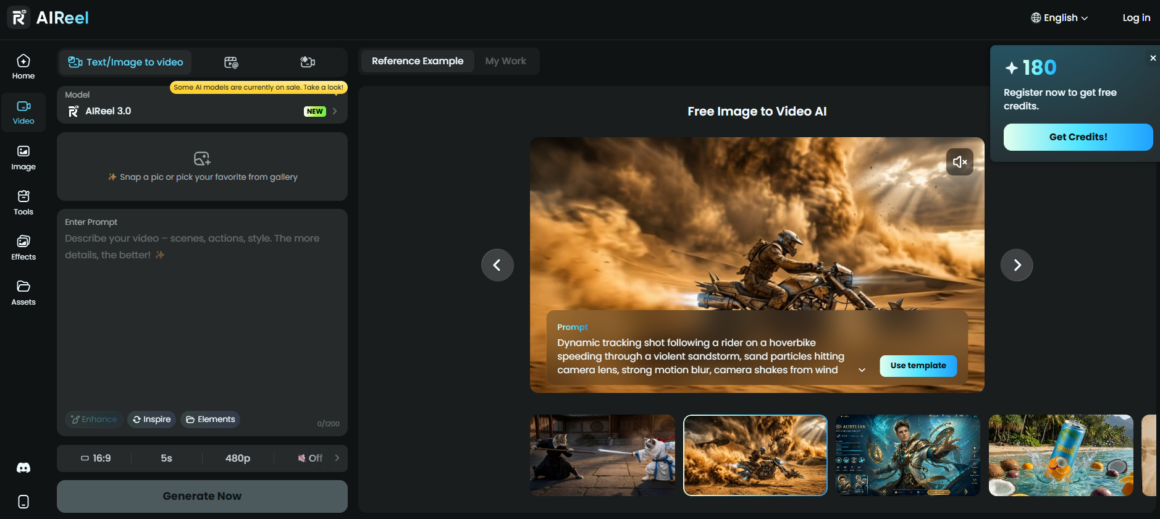
This shift matters because B-roll footage has always been one of the most time-consuming parts of video production. Traditionally, editors had three options: film it themselves, license it from a stock site, or skip it entirely and accept a less engaging video. AI-generated B-roll adds a fourth option that’s faster and often more flexible than the other three. Platforms like AIReel have emerged specifically to fill this gap, giving creators a way to generate original footage directly from a text description or an existing photo — including a dedicated image-to-video tool for animating still images into motion.
Why Creators Are Turning to AI B-Roll
The appeal of AI-generated B-roll comes down to three things: speed, cost, and customization.
- Speed. Generating a clip with AI B-roll tools takes seconds to minutes, compared to hours of filming or searching stock libraries.
- Cost. Stock footage subscriptions and licensing fees add up quickly, especially for channels publishing multiple videos a week. AI tools typically operate on flexible, usage-based pricing.
- Customization. Stock footage is generic by nature — thousands of other creators are using the same clips. An AI video B-roll tool can generate footage tailored to your exact script, tone, and visual style, so your content doesn’t look like everyone else’s.
For YouTubers in particular, this is a major advantage. A dedicated AI B-roll generator for YouTube content can match pacing, aspect ratio, and visual tone to the platform’s expectations, helping videos feel more dynamic without inflating production timelines.
How to Create B-Roll with AI
The process to create B-roll with AI typically follows a simple workflow. Here’s how it works with a tool like AIReel:
- Write or paste your script or scene description. Most tools let you describe the shot you need — a city skyline at dusk, a close-up of hands typing, a slow pan across a mountain range. With AIReel, you can type any text and let the AI automatically generate cinematic scenes and narratives.
- Select a style. Cinematic, documentary, corporate, or stylized — the AI adjusts lighting, motion, and composition accordingly. AIReel offers over 100 daily-updated templates synced with TikTok and Reels trends, so you can match the visual tone to your platform and audience.
- Generate the clip. The AI renders a short video sequence based on your input. AIReel is powered by top-tier AIGC models including Sora, Veo 3, Hailuo, and its newly launched Seedance 2.0, delivering clips typically within 1 to 3 minutes. You can also control exactly how your video starts and ends — set a starting frame and an ending frame, and let AI generate a smooth transition between them.
- Review and refine. Most platforms allow you to regenerate or tweak clips until the footage fits your edit. AIReel supports multi-angle scenes and continuous shot generation with consistent characters across shots, so you’re not just generating isolated clips — you’re building scenes with intent.
- Export and drop into your timeline. The finished B-roll footage integrates directly into your existing editing software. AIReel supports multiple export formats, including 9:16, 16:9, and 1:1, making it easy to match the aspect ratio of any platform
This is significantly faster than the traditional method of searching stock sites by keyword, downloading multiple options, and hoping one fits the exact mood of your scene.
Image to Video AI: Turning Photos into Motion
One of the most useful features bundled into modern B-roll tools is image-to-video AI — the ability to turn a photo into video with realistic motion, camera movement, and depth. This is especially valuable for creators who already have a library of photography or product images but lack matching video footage.
Instead of reshooting a product, location, or portrait, an image-to-video tool animates the existing photo: adding subtle camera pans, parallax depth, or environmental motion like drifting clouds or rippling water. It’s a practical bridge between static assets and dynamic video content, and it’s one of the fastest-growing use cases in AI-assisted editing.
Choosing the Right B-Roll Generator
Not all AI video tools are built the same. When evaluating a B-roll generator, consider:
- Output quality and resolution — does it support HD or 4K exports suitable for YouTube and other platforms?
- Style flexibility — can it produce different moods (cinematic, minimal, corporate, vlog-style)?
- Image-to-video support — can it animate your own photos, not just generate footage from text?
- Speed of generation — how long does it take to go from prompt to finished clip?
- Integration — does the output fit smoothly into your existing editing workflow?
Tools built specifically around these needs — offering both text-to-video generation for original B-roll and dedicated image-to-video animation like AIReel — tend to serve creators better than general-purpose AI video platforms that treat B-roll as an afterthought.
Conclusion
As AI video models continue to improve in realism and controllability, the gap between AI-generated footage and traditionally filmed B-roll will keep narrowing. For solo creators, YouTubers, and small production teams without access to large budgets or filming crews, this represents a genuine shift in what’s possible — high-quality, story-matched visuals generated in the time it used to take just to plan a shoot.
Whether you’re filling gaps in a YouTube video, building out an explainer, or simply want to breathe life into a photo, AI B-roll tools are quickly becoming a standard part of the modern editing toolkit — not a novelty, but a practical solution to a problem every video creator knows well. Platforms like AIReel are leading this shift, giving creators a powerful, accessible way to generate cinematic B-roll and animate still images in seconds — without the traditional production overhead.
About the Author