A blurry vacation photo, a scanned family portrait from the 1990s, a product shot that looked fine on a phone screen but falls apart the moment you zoom in – most people have a folder of images like this sitting somewhere, quietly waiting for a fix that never quite happens in traditional editing software. What changed the equation isn’t a new filter or a sharpening slider pushed to the max. It’s a different kind of processing entirely, the same category of technology behind tools like the enhance image feature on Image Upscaler, which rebuilds missing visual information instead of just adjusting what’s already there. Understanding how that rebuilding actually happens explains why AI enhancement produces results that manual editing simply can’t match, and why it fails in specific, predictable ways too.
What AI Enhancement Is Actually Doing
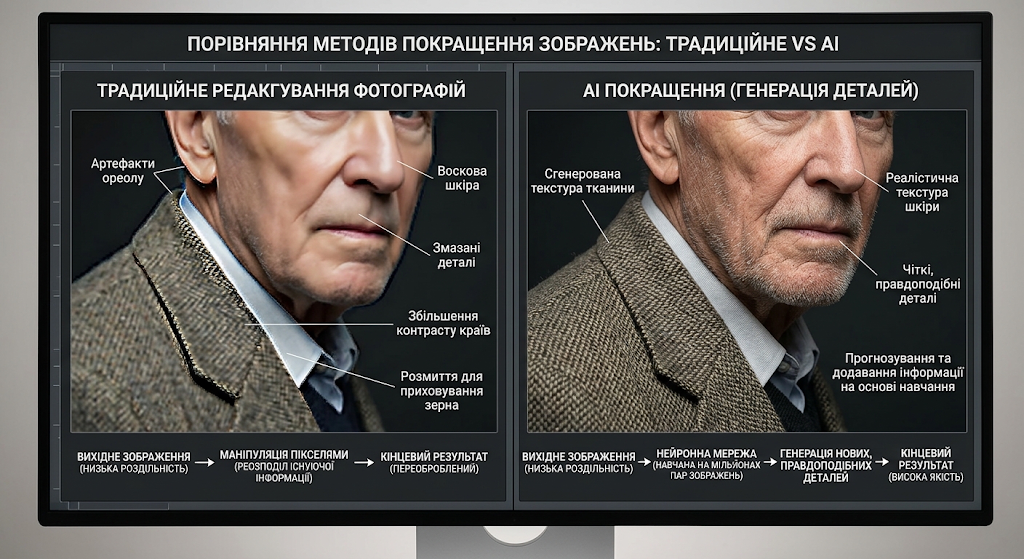
Traditional photo editing works with the pixels you already have. A sharpening tool increases contrast along edges; a denoise filter blurs and smooths to hide grain. Both approaches can only rearrange existing information, which is why pushing them too far produces that telltale over-processed look – halos around edges, waxy skin, smeared detail.
AI enhancement takes a different starting point. A neural network trained on millions of image pairs, usually a high-quality original alongside a degraded version, learns statistical patterns about what detail typically looks like at higher resolutions or under cleaner conditions. When you feed it a low-quality photo, it isn’t stretching pixels; it’s predicting what plausible detail should exist based on everything it learned during training, then generating that detail directly into the image. This is why AI upscaling can add texture to hair or fabric that was never technically recorded by the original camera sensor, in a way that looks convincing rather than synthetic when the model has been trained well.
The Three Problems Most AI Enhancers Are Actually Solving
Most tools marketed as “AI image enhancers” are really running several distinct correction processes, often in sequence, even though the interface presents it as one click.
Resolution and detail get handled by super-resolution models, which increase pixel dimensions while inferring new detail rather than simply duplicating existing pixels the way basic interpolation does. Noise and grain are addressed by separate denoising networks trained specifically to distinguish real texture from sensor noise or compression artifacts, a distinction that matters because overly aggressive denoising is exactly what produces that flat, plasticky look people associate with bad AI editing. Faces get their own dedicated treatment in many pipelines, since human vision is extremely sensitive to facial distortion; specialized restoration models trained heavily on face data handle eyes, skin texture, and features with more precision than a general-purpose model would manage on its own.
Color correction and exposure balancing often run alongside these, adjusting white balance and contrast based on learned patterns from well-exposed reference photos rather than a fixed formula. A single “enhance” click on a consumer tool is frequently coordinating three or four of these specialized processes behind the scenes, choosing which to apply and how aggressively based on what the model detects in the specific image.
Where the Technology Still Has Real Limits
None of this works as well as marketing pages sometimes imply, and understanding the failure modes matters as much as understanding the successes.
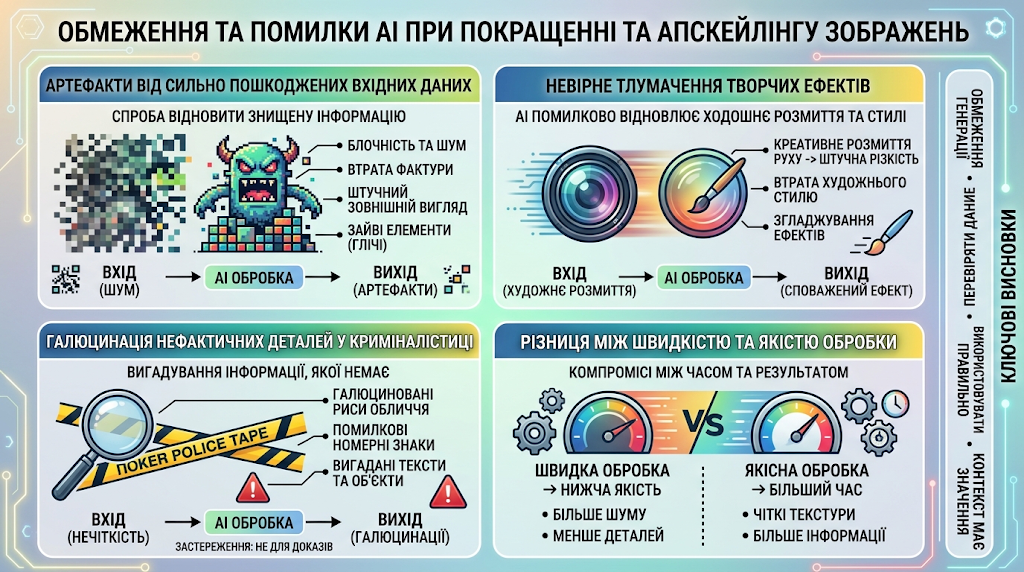
Severely degraded source images give the model very little to work with, so the output tends to look artificial no matter how strong the algorithm is – there simply isn’t enough underlying signal for even a well-trained network to infer from convincingly. Heavily stylized or unusual photography, things like motion-blur art shots, extreme macro photography, or intentionally low-fidelity aesthetics, can confuse models trained mostly on conventional photos, sometimes “correcting” details that were deliberate creative choices in the first place. And because these models generate plausible detail rather than recovering the literal original information, there’s an inherent risk in forensic or legal contexts: an AI-enhanced image should never be treated as factual reconstruction of what a camera actually captured, since the added texture is a statistical guess dressed up convincingly.
Processing time and output quality also vary considerably depending on how the underlying model was trained and how much computation a given tool allocates per image, which is part of why results across different enhancers can look meaningfully different even on the exact same source photo.
Getting Useful Results in Practice
A few practical habits make a measurable difference in outcomes, regardless of which specific tool is doing the processing.
Starting resolution matters more than most people expect. A photo that’s already reasonably sharp but small will upscale far more convincingly than one that’s both tiny and badly compressed, since the model has more genuine signal to build from in the first case. It also helps to treat enhancement as one step in a workflow rather than a single fix-all action – correcting exposure or cropping before enhancement, rather than after, generally gives the model cleaner input to work with. For images with faces, checking results at full resolution before finalizing is worth the extra thirty seconds, since facial restoration artifacts are the type of error viewers notice first and forgive least.
Batch processing introduces its own considerations. Uniform settings applied across a mixed folder of high- and low-quality originals will treat every image the same way, so results tend to be more consistent when photos are grouped by starting quality first rather than processed as one undifferentiated batch.
The Direction This Technology Is Heading
Enhancement models are increasingly being trained on more diverse datasets to reduce failure cases with non-standard photography, and the gap between general-purpose and specialized (face-only, product-only, document-only) models continues to narrow as computation gets cheaper. What used to require professional retouching skills and dedicated software now runs through a browser tab in seconds, which has quietly changed workflows for e-commerce sellers, genealogy researchers digitizing old family archives, and anyone trying to salvage photos that would otherwise have stayed unusable. The underlying science is still advancing quickly enough that the honest answer to “how good can this get” is that nobody fully knows yet – but understanding what these models are actually doing, rather than treating them as a magic fix button, is what separates people who get consistently good results from people who are disappointed by the first image that doesn’t cooperate.
Looking ahead, the integration of multimodal AI frameworks will likely allow image enhancers to interpret context beyond raw pixel data. By combining visual recognition with textual cues or scene metadata, future models will be able to distinguish between intentional texture and unwanted artifacts with far greater precision, tailoring adjustments to the specific context of an image rather than relying solely on statistical probability.
As edge computing capabilities continue to advance, these sophisticated algorithms will increasingly run locally on consumer devices rather than relying on cloud servers. This shift will drastically reduce latency, protect user privacy, and make professional-grade real-time image enhancement a standard background feature across mobile interfaces and desktop editing suites alike.
About the Author